



When you move photos from an iPhone or iPad to a Windows PC, you may notice extra files with the .AAE extension appearing alongside your pictures. These files are related to photo edits made on Apple devices. Here’s what AAE files are, why they appear, and whether you need to keep them.
What Are AAE Files?
AAE files are small companion files created by Apple’s Photos app to record edits made to pictures on an iPhone or iPad.
When you edit a photo, the original image is usually kept unchanged. Instead, the device stores the editing instructions in a separate XML-based file with the .AAE extension. This allows the edits to be applied without permanently altering the original photo and makes it possible to undo those changes later.
AAE files are typically stored next to the images they belong to. For example, a photo named IMG_0026.HEIC may have a matching file called IMG_0026.AAE that contains information about the edits made to that photo.
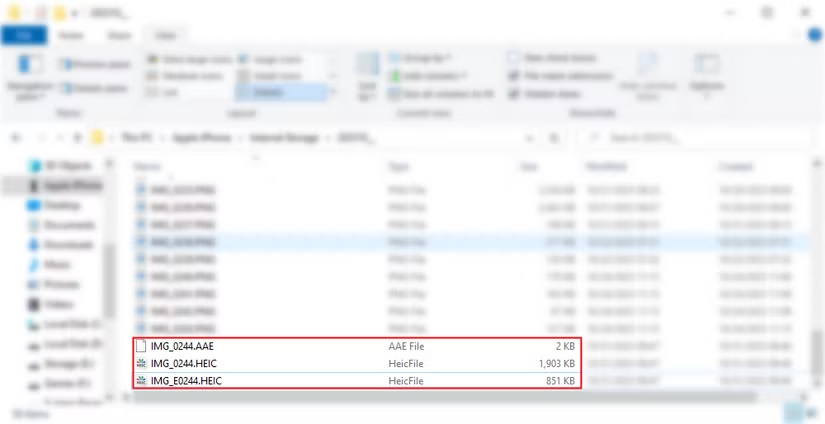
In this example, opening the iPhone in Windows File Explorer revealed two matching files: the original photo, IMG_0244.HEIC, and its accompanying edit file, IMG_0244.AAE.
What Does AAE Stand For?
Apple has never clearly stated what the AAE abbreviation officially means. One common theory is that the format is connected to Apple’s former Aperture photo-editing software, which used XML sidecar files to store non-destructive editing information. Because of this, AAE is sometimes interpreted as something similar to “Apple Aperture Edits” or “Apple Aperture Extension.”
AAE files began appearing around the time Apple introduced newer versions of iOS and macOS and shifted its focus from Aperture and iPhoto to the Photos app. This timing supports the idea that the AAE format may have evolved from Apple’s earlier photo-editing system, although its exact meaning has never been officially confirmed.
Do I Need to Save AAE Files?
If you plan to keep your iPhone or iPad photos permanently on a system that does not use Apple Photos, such as Windows or Linux, you usually do not need the AAE files. They can generally be deleted without affecting the original image files.
However, if you may move those photos back to an iPhone, iPad, or Mac later, keeping the AAE files can be useful. Store them in the same folder as their matching original photos. This gives Apple Photos a better chance of recognizing and restoring the edits that were previously made to those images.
Can You Open an AAE File?
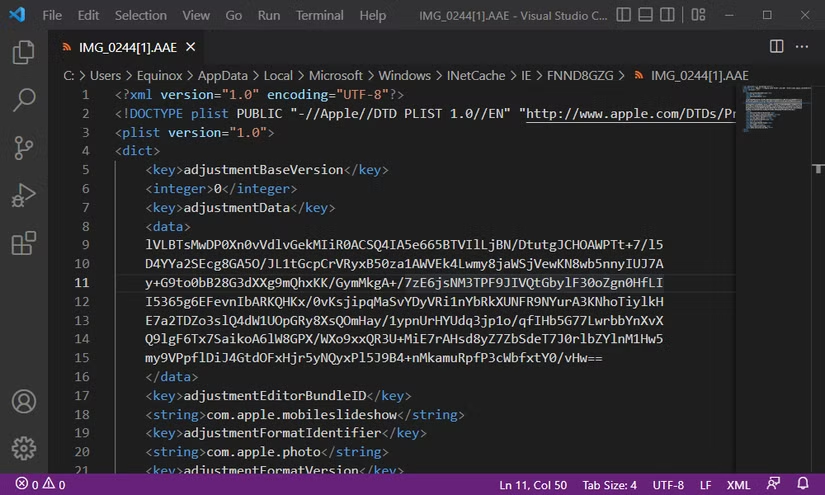
Yes, an AAE file can be opened with a basic text editor on Windows, macOS, Linux, ChromeOS, or Android. However, the file mainly contains XML-based editing instructions, so the information is not especially useful to most users.
The actual edit data is intended to be interpreted by Apple Photos, which uses the AAE file to recreate changes made to the original image.
Tip: If you want to inspect an AAE file, use a code editor such as Visual Studio Code. Syntax highlighting and preserved formatting can make the XML content much easier to read.
On iPhone, iPad, and Mac, the Photos app handles AAE files automatically in the background, so you do not need to open or manage them manually.
As long as an AAE file remains in the same folder as its matching photo, Apple Photos can recognize it and apply the saved editing information when needed.
Frequently Asked Questions
What is an AAE file on an iPhone?
An AAE file is a small sidecar file created by Apple Photos to store editing instructions for a photo. It allows the original image to remain unchanged while preserving edits such as cropping, filters, and adjustments.
Can I delete AAE files safely?
Yes, you can usually delete AAE files if you no longer need the editing information associated with the photos. Deleting them does not normally remove or damage the original image files.
What happens if I delete an AAE file?
The original photo will remain intact, but Apple Photos may no longer be able to restore or recognize the edits that were previously made to that image.
Do AAE files contain photos?
No. AAE files do not contain the actual image. They mainly store XML-based instructions that describe the edits made to a corresponding photo.
Can I open an AAE file on Windows?
Yes, an AAE file can be opened with a text or code editor on Windows. However, the content mainly consists of editing data and is not very useful unless it is interpreted by Apple Photos.
Should I keep AAE files when transferring iPhone photos?
Keep them if you may move the photos back to an iPhone, iPad, or Mac and want to preserve the original edits. If you are keeping the images permanently on another platform, the AAE files are usually unnecessary.
Why do AAE files appear next to my iPhone photos?
AAE files appear because Apple Photos saves edits separately from the original image. A matching AAE file is often stored alongside the photo so compatible Apple devices can apply those edits automatically.
Conclusion
AAE files are small companion files created by Apple Photos to store edits made to pictures without changing the original image. They are useful if you want to preserve those edits when moving photos between Apple devices.
If you are keeping your photos on Windows, Linux, or another platform that does not use Apple Photos, AAE files are usually not necessary and can be deleted safely. However, keeping them is a good idea if you may return the photos to an iPhone, iPad, or Mac and want the original edits to remain available.
