


Android can sometimes be difficult to keep track of because many different versions are still in use across various devices. Staying on the latest release is not always easy, especially since some phones stop receiving major Android updates after a certain period.
Google typically releases one major Android version each year, along with monthly security updates in between. From time to time, smaller point releases such as Android 8.1 may also appear. These updates usually introduce more noticeable improvements than a standard security patch but are not large enough to be considered a completely new Android version.
For years, Android versions were also known by dessert-themed nicknames, and many users referred to them by those names instead of version numbers. Google stopped using dessert names publicly starting with Android 10 in 2019.
A Brief Android Version History
Android has gone through many major updates over the years, with each version bringing new features, design changes, and improvements. Here’s a quick look at the major Android releases, along with their code names and release dates.
- Android 1.5, Cupcake: April 27, 2009
- Android 1.6, Donut: September 15, 2009
- Android 2.0–2.1, Eclair: October 26, 2009
- Android 2.2–2.2.3, Froyo: May 20, 2010
- Android 2.3–2.3.7, Gingerbread: December 6, 2010
- Android 3.0–3.2.6, Honeycomb: February 22, 2011
- Android 4.0–4.0.4, Ice Cream Sandwich: October 18, 2011
- Android 4.1–4.3.1, Jelly Bean: July 9, 2012
- Android 4.4–4.4.4, KitKat: October 31, 2013
- Android 5.0–5.1.1, Lollipop: November 12, 2014
- Android 6.0–6.0.1, Marshmallow: October 5, 2015
- Android 7.0–7.1.2, Nougat: August 22, 2016
- Android 8.0–8.1, Oreo: August 21, 2017
- Android 9, Pie: August 6, 2018
- Android 10: September 3, 2019
- Android 11: September 8, 2020
- Android 12: October 19, 2021
- Android 13: August 15, 2022
- Android 14: October 4, 2023
- Android 15: September 3, 2024
- Android 16: June 10, 2025
Android releases were less predictable during the platform’s early years. Over time, however, Google moved toward a more consistent schedule, with major Android versions generally arriving once a year.
There are also a few interesting milestones in Android’s history:
- Honeycomb was designed specifically for tablets and existed alongside Gingerbread, which was primarily used on smartphones. Google later brought the phone and tablet experiences together with Ice Cream Sandwich.
- Ice Cream Sandwich was one of Android’s biggest updates, introducing a major visual redesign while unifying the phone and tablet versions of the operating system.
- Google originally used its Nexus devices to showcase new versions of Android and provide developers with reference hardware. The Nexus line was later replaced by the consumer-focused Pixel series.
- Android KitKat marked a notable partnership between Google and a commercial brand for an Android version name. A similar approach was later used with Android Oreo.
The Latest Version of Android Is 16
Android 16 is currently the latest major version of Android. It was released on June 10, 2025, initially rolling out to Google Pixel devices before becoming available on Samsung Galaxy phones and other supported devices. Smartphones from brands such as OnePlus, Xiaomi, Nokia, and others are also expected to receive the update depending on device eligibility.
Following the naming approach introduced with Android 10, Android 16 does not use a public dessert nickname. Internally, however, Google gave the release the codename “Baklava.” Instead of continuing with the expected letter “W,” Google restarted its alphabetical naming sequence as part of changes to its development and build process.
Android 16 may not introduce a dramatic visual overhaul for every user, but it includes several useful improvements and new features. Some of the highlights include Live Updates, lock screen widgets, grouped notifications, an improved desktop mode, and a variety of smaller performance and usability enhancements.
How to Check Your Version of Android
The exact steps for checking your Android version can vary slightly depending on your phone’s manufacturer, but the general process is similar on most devices.
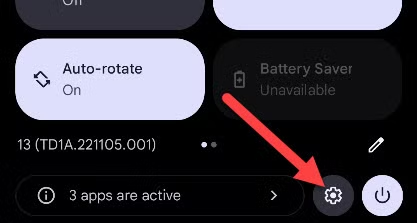
Start by opening the Settings app. You can usually do this by swiping down from the top of the screen once or twice to open the notification panel, then tapping the gear icon.
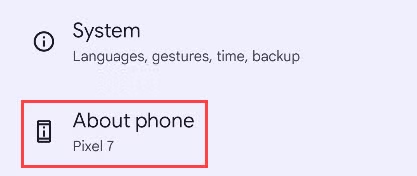
Next, scroll to the bottom of the Settings menu and tap About Phone. On some devices, this option may be labeled About Device instead.
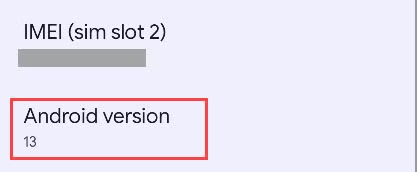
Look for an option labeled Android Version. The exact wording or location may vary depending on your device manufacturer and the version of Android you’re using.
How to Update to the Latest Version of Android
Whether you can update to the newest version of Android depends on your device and its manufacturer. Most Android updates are provided by the phone maker, while Google directly manages updates for Pixel devices.
To check for an available update, open Settings > System > System Update, or look for a similar option on your device. The exact location can vary by brand. For example, on Samsung phones, you can usually go to Settings > Software Update > Download and Install.
If an update is available for your device, follow the on-screen instructions to download and install it.
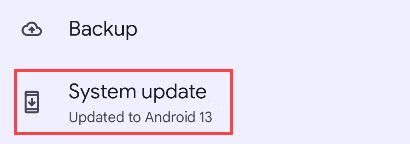
Tapping this option will check whether a new software update is available for your device. If no update appears, your phone may already be running the latest version currently available for it.
When a new update becomes available, your device will usually send a notification and give you the option to download and install it.
One of the most reliable ways to receive the latest Android updates quickly is to use a Google Pixel phone. Because Google manages Pixel software directly, these devices are typically among the first to receive major Android releases and regular security updates.
Frequently Asked Questions
What is the latest version of Android?
Android 16 is the latest major version of Android.
When was Android 16 released?
Android 16 was officially released on June 10, 2025.
Which phones get the latest Android version first?
Google Pixel phones are usually among the first devices to receive new Android versions because Google manages their software updates directly.
How can I check which Android version I have?
Open Settings > About Phone and look for Android Version. The exact menu location may vary depending on your device.
How do I update my Android phone?
Go to Settings > System > System Update and check for updates. On Samsung phones, you can usually use Settings > Software Update > Download and Install.
Why can’t I update to the latest Android version?
Your phone may not support the newest release, or your manufacturer may not have released the update for your specific model yet.
Does every Android phone receive the latest version?
No. Update availability depends on the phone model, manufacturer, region, and software support policy.
Conclusion:
Android 16 is the latest major version of Android, bringing new features, improvements, and security updates to supported devices. However, whether you can install it depends on your phone model and manufacturer. You can check your current Android version and look for available updates in the Settings app. If receiving the newest Android releases quickly is important to you, Google Pixel phones are usually among the first to get them.
